Prototypes and clickable mockups: why we show before we build
Changing a decision costs minutes in a sketch and weeks after launch. What a clickable prototype is, what it proves, and how it shortens a project.
 By Shalena Opbroek, Founder and CEO
The short answer
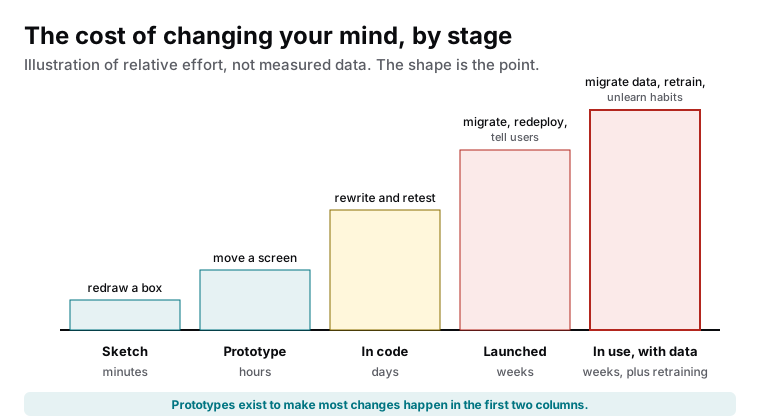
A clickable prototype is a set of designed screens linked together, so a person can tap through the software as if it existed. It looks real and does nothing underneath: no data, no logic, no integrations. Its job is to move decisions to the stage where changing them is cheap. Redrawing a box costs minutes. Moving a screen in a prototype costs hours. Rewriting a feature in code costs days. Changing launched software that people have learned and filled with data costs weeks and goodwill. Every software project we run starts with a prototype for that reason.
What a prototype proves, and what it cannot
| Question | Prototype answers it? | What answers it instead |
|---|---|---|
| Do users understand the flow without instruction? | Yes | |
| Are the right things on each screen, in the right words? | Yes | |
| Does the team agree on what is being built? | Yes, because it is concrete | |
| Will it be fast enough? | No | A technical proof of concept |
| Will the integration with the accounting system work? | No | A technical spike against the real API |
| What happens with ten thousand records? | No | Load testing on real code |
| How do errors and edge cases behave? | Partly, if designed in | Real implementation and testing |
How a prototype round runs
- Sketch the flows on paper or a whiteboard from the brief: what a user is trying to do, in what order.
- Design the screens for the main flows using the design system, so they look like the eventual product.
- Link them into a clickable walkthrough of each task.
- Test with real users. Give them a task, not a tour, and watch where they hesitate. Five people find most problems.
- Change and repeat until the tasks are completed without help. Each round is hours, not weeks.
- Freeze the flows and hand the prototype to the build as the reference, alongside the technical proofs for anything risky.
Where the technical proof fits
A prototype tests understanding; a technical proof of concept tests feasibility. If the project depends on something uncertain, an integration with an unfamiliar system, a performance target, a device feature, a small piece of throwaway code that proves it works belongs alongside the prototype, before the build is priced. The two together mean the build starts with the risky questions answered: people can use it, and it can be built.
What this means for you
Insist on seeing before building. A prototype round costs a small fraction of the project and pulls most of the expensive decisions into the stage where changing them costs hours. Test it with the people who will actually use the software, pair it with technical proofs for anything uncertain, and freeze the flows before the build is priced. The cheapest change is the one made before the code exists.

Founder and CEO of CivSec S.M.A.R.T, and responsible for everything we publish in this knowledge base.
How this article was made: researched and drafted with the help of AI tools, working from the sources listed below, and checked before publication. How we write.
Last updated . Spotted something outdated? Tell us.
Frequently asked questions
Is a prototype extra cost on top of the build?
It is a small cost that removes a larger one. Every screen changed in the prototype is a screen not rebuilt in code, and every misunderstanding found in a walkthrough is a feature not built wrong. On any project of more than a few weeks, the prototype pays for itself before the build starts.
Can the prototype become the real app?
The design can; the prototype file cannot. A prototype is linked pictures. The real app is code, data and logic. What carries over is the decisions: the flows, the screens, the components, the words. That is the valuable part, and it carries over completely.
Who should test the prototype?
The people who will use the software daily: the staff member processing orders, the customer booking, the manager approving. The person who commissioned it already understands the idea; the test is whether someone without that context can complete the task without being told how.