From idea to working software: the process, step by step
From a sentence to working software in seven stages: scope, design, build, test, launch, learn, maintain. What happens in each, and where projects go wrong.
 By Shalena Opbroek, Founder and CEO
The short answer
Working software comes from a process with seven stages, each producing something you can see and approve. Scope produces a one-page agreement. Design produces clickable screens. Build produces working software every week. Test produces a report and your sign-off. Launch produces a live system with documentation. Learn produces the list for version two. Maintain keeps it all working.
Projects rarely fail because of the code. They fail because a stage was skipped.
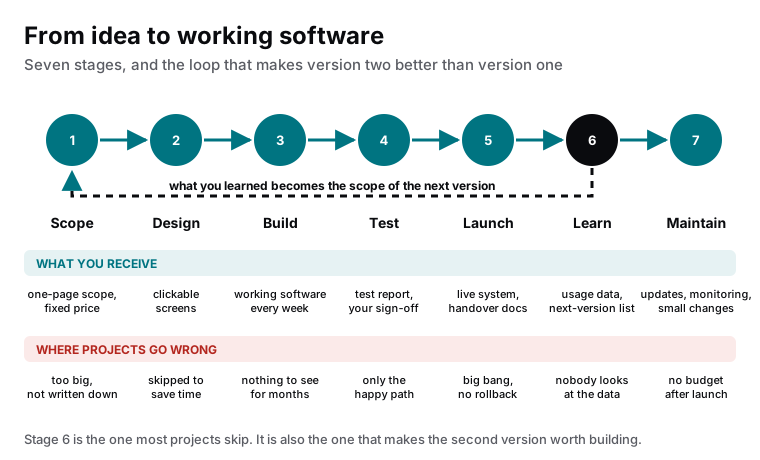
The seven stages
- Scope. One page: the question the software must answer, who uses it, what it must do in the first version, what it explicitly will not do yet, and a fixed price for that. Where it goes wrong: too big, or not written down at all.
- Design. Clickable screens of the real flows before any code. Everyone sees the system, and changes cost minutes. Where it goes wrong: skipped to save time, then redone in code at many times the cost.
- Build. Working software, growing every week, on a preview link you can open. Feedback arrives while it is cheap to act on. Where it goes wrong: months of silence followed by a big reveal.
- Test. The happy path and the unhappy ones: bad input, failed integrations, wrong permissions, real data volumes. A report, and your sign-off on what you tested yourself. Where it goes wrong: only the happy path, tested by the people who built it.
- Launch. A live system, a way to roll back, handover documentation, and a written record of who holds each account. Often a phased start: a few users first, then everyone. Where it goes wrong: everyone at once, on a Friday, with no way back.
- Learn. Real usage data after a few weeks: what people do, where they stop, what they ask for. This becomes the scope of version two. Where it goes wrong: nobody looks, and version two is built on the same guesses as version one.
- Maintain. Updates, monitoring, security patches, small changes, in a monthly scope. Where it goes wrong: no budget after launch, and the system quietly rots.
What you should be able to see at each stage
| Stage | What you receive | Your decision |
|---|---|---|
| Scope | One page, fixed price | Is this the right first version? |
| Design | Clickable screens | Is this how it should work? |
| Build | Weekly working software | Is this what we agreed? |
| Test | Test report, your own testing | Is it ready for real use? |
| Launch | Live system, docs, rollback plan | Go, and with whom first? |
| Learn | Usage data, next-version list | What is version two? |
| Maintain | Monthly report | Is the scope still right? |
The loop that gets skipped
Stage six is where the value of custom software is decided. Version one was built on the best available guesses. Real use replaces the guesses with facts: which features are used daily, which are ignored, where people get stuck, what they ask for. The next scope is written from those facts, and version two is better for reasons nobody could have predicted at the start.
What this means for you
When you commission software, ask for the seven stages by name and what you will receive at each. A supplier who works this way will describe it without prompting. Then protect stages one and two from the urge to start building, and stages six and seven from the urge to consider the project finished. The building is the easy part.

Founder and CEO of CivSec S.M.A.R.T, and responsible for everything we publish in this knowledge base.
How this article was made: researched and drafted with the help of AI tools, working from the sources listed below, and checked before publication. How we write.
Last updated . Spotted something outdated? Tell us.
Frequently asked questions
How long does the whole process take?
From weeks for a focused internal tool to months for a system with several roles and integrations. The largest factor is how clear the scope is at the start. Projects that start with a one-page scope and clickable screens move fast; projects that start with a conversation and good intentions do not.
Can we skip design and go straight to building?
You can, and you will design anyway, in code, at ten times the cost per change. Clickable screens take days and let everyone see the system before it exists. Every change made at that stage is a change not made in code.
What do we see during the build?
Working software every week, on a preview link, growing feature by feature. Not a demo at the end. If a supplier goes quiet for two months and then presents, something has gone wrong, whatever they say.
What happens after launch?
Two things that are often forgotten. Learning: looking at what people actually do and turning that into the next version. And maintenance: updates, monitoring, security patches and small changes, budgeted from the start. Software without both is a project that ends, not a system that works.