Native, hybrid or progressive web app: the honest comparison
Native, hybrid or progressive web app: what each means, what it costs to build and maintain, and a decision table for the app you are considering.
 By Shalena Opbroek, Founder and CEO
The short answer
There are three ways to put an app on someone’s phone. Native apps are written separately for iOS and Android and can use everything the device offers. Hybrid apps share one codebase, wrapped for each store, and reach most device features. Progressive web apps are websites built so they install, run full screen and work offline, with no store in between.
None is best. Each is right for a different app, and the wrong choice is paid for every year in maintenance.
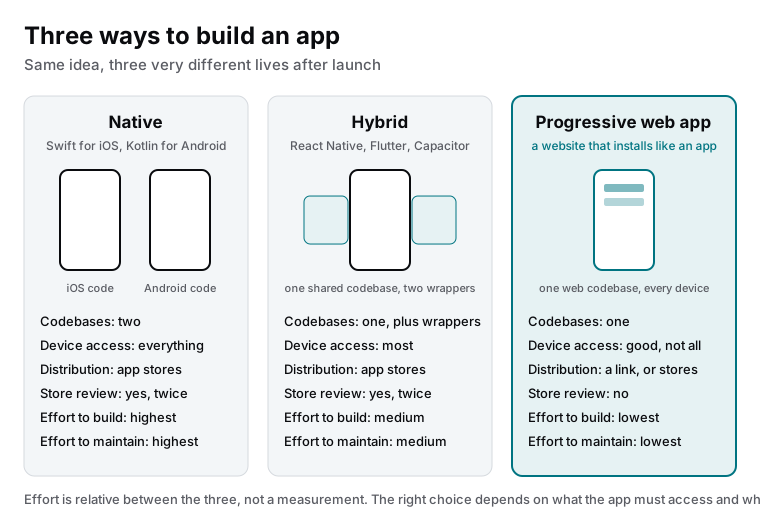
The three, side by side
| Native | Hybrid | Progressive web app | |
|---|---|---|---|
| Codebases | Two, one per platform | One, plus thin wrappers | One |
| Device access | Everything | Most things | Good; some hardware features limited, differences between platforms |
| Distribution | App stores | App stores | A link, and optionally the stores |
| Store review | Yes, for every release, twice | Yes, twice | No |
| Offline | Full | Full | Yes, for what is cached |
| Notifications | Full | Full | Supported on the major platforms with some limits |
| Build effort | Highest | Medium | Lowest |
| Yearly maintenance | Highest, doubled | Medium | Lowest |
| Best for | Hardware-heavy apps, products that live in the stores | Consumer apps that need store presence with one team | Portals, booking, field forms, internal tools and business apps |
How to decide
- List the device features you truly need. Camera and location are available to all three. Background sensors, deep hardware integration or platform-specific features point to native.
- Ask where users will look for you. Customers who already know you, and your own staff, will install from a link. A product that must be discovered in the stores needs to be there.
- Define offline needs. Occasional offline use with cached data suits a PWA. Heavy offline work with large local data suits native or hybrid.
- Count the maintenance you can carry. Every platform is a yearly cost in updates, store rules and device changes. Two native codebases mean two of everything.
- Check the backend. Most of the work is the server, data and integrations, which are the same for all three. Do not let the app type decide the project before the backend is scoped.
What we recommend
For client portals, booking tools, field forms, internal tools and most business applications: a progressive web app, often growing out of the same codebase as the web application. For consumer-facing apps that must be in the stores and one team has to maintain: hybrid. For apps whose value lives in hardware features, or that are products in the stores in their own right: native, with the maintenance budget written down before the first line of code.
What this means for you
Write down the device features you need, where users will find the app, how it must behave offline, and how much yearly maintenance you can honestly carry. Those four answers point at one of the three types, and in most business cases they point away from native. Then scope the backend, because that is where the real project is.

Founder and CEO of CivSec S.M.A.R.T, and responsible for everything we publish in this knowledge base.
How this article was made: researched and drafted with the help of AI tools, working from the sources listed below, and checked before publication. How we write.
Last updated . Spotted something outdated? Tell us.
Frequently asked questions
Do we need to be in the app stores?
Only if your users will look for you there, or if you rely on store features such as in-app purchases. A progressive web app is installed from a link, which is fine for customers who already know you and for staff. A hybrid app can be in the stores if presence there matters.
Is a progressive web app a real app?
It installs on the home screen, opens full screen, works offline for what it has cached, and can send notifications on the major platforms. It cannot reach every hardware feature, and some capabilities differ between iPhone and Android. For a large share of business use cases it is a real app in every way that matters to the user.
What does an app cost to maintain?
More than people expect. Operating systems update yearly, store rules change, libraries need patching, and devices change. Native apps carry this twice. Budget for maintenance from the start, or the app that was fine at launch will stop working within two years.
Can we start with a web app and go native later?
Yes, and it is often the right order. A progressive web app proves the demand with the least investment. If it turns out users need something only native offers, you build that with evidence, and the backend you built already serves it.
Sources
- MDN Web Docs: Progressive web apps (accessed 2026-09-11)