What DNS is, in plain terms, and why it breaks websites
DNS turns your domain into the address of your website and email. Six records do most of the work, and one wrong record takes a business offline.
 By Shalena Opbroek, Founder and CEO
The short answer
When someone types your domain into a browser or sends you an email, their device has to find out where to go. DNS, the domain name system, is the address book that answers that question. For your domain it is a small table of records, kept at your registrar or a DNS provider, that says: the website is here, the email goes there, and here is proof that this domain is really ours.
It is one of the least visible parts of your setup and one of the most common reasons a business is suddenly offline.
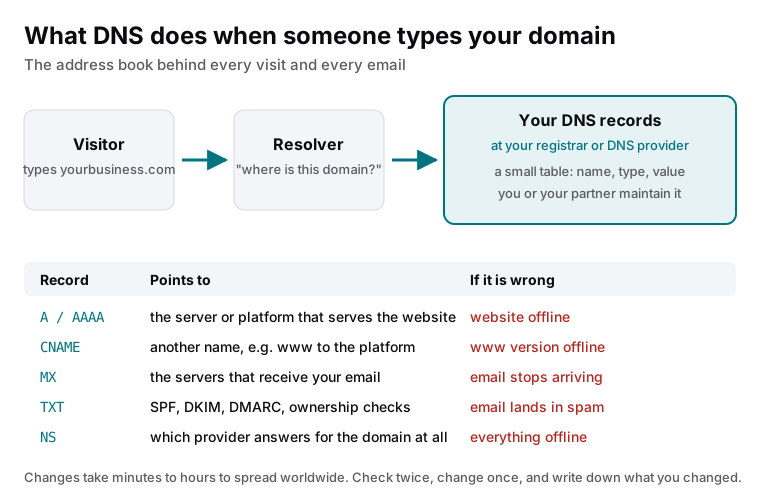
The six records that matter
| Record | What it does | What breaks if it is wrong |
|---|---|---|
| A and AAAA | Point the domain at the address of the server or platform serving the website | Website offline |
| CNAME | Point one name at another, typically www at the hosting platform | The www version offline, or the whole site if misused |
| MX | Name the servers that receive email for the domain | Email stops arriving |
| TXT | Hold text values: SPF, DKIM and DMARC for email, and ownership checks for Google and other services | Email lands in spam; services cannot be verified |
| NS | Say which provider answers DNS questions for the domain at all | Everything offline |
| CAA | Say which certificate authorities may issue certificates for the domain | Certificate renewal fails, site shows warnings |
Why DNS breaks websites
Three patterns account for the DNS incidents that take a website or its mail offline:
- Migration without a checklist. A new website goes live, DNS moves to a new provider, the website records are set, and the MX and TXT records are forgotten. Website up, email gone.
- The domain transfer. The domain moves to a new registrar and the DNS records do not come with it, or the new registrar’s default records take over. Everything points nowhere.
- Nobody knows the login. Records need a change, the account was created years ago by someone who left, and the recovery email is a mailbox that no longer exists.
How to keep it boring
- One account, in your name. DNS lives at one provider, in an account owned by your company, with two-factor authentication and a documented recovery address.
- Export the records. A copy of the full record table, stored with your documentation, refreshed whenever something changes.
- A migration checklist. Before any move: lower TTLs, list every record, especially MX and TXT, and verify each one after the move from an outside network.
- Email records complete. MX for receiving; SPF, DKIM and DMARC as TXT so your email is trusted. Details in the email spoofing article.
- CAA set. So only your certificate provider can issue certificates for your domain.
What this means for you
You do not need to edit DNS yourself. You need to know it exists, which account holds it, who is allowed to change it, and that a copy of the records is in your documentation. With those four things in place, DNS goes back to being invisible, which is exactly what it should be.

Founder and CEO of CivSec S.M.A.R.T, and responsible for everything we publish in this knowledge base.
How this article was made: researched and drafted with the help of AI tools, working from the sources listed below, and checked before publication. How we write.
Last updated . Spotted something outdated? Tell us.
Frequently asked questions
Is DNS the same as my domain?
No. The domain is the name you rent. DNS is the set of records that say what the name points to. You can move DNS to another provider without moving the domain, and moving the domain without copying the DNS records correctly is how email disappears for two days.
Why did our email stop after the new website went live?
Almost certainly the MX or TXT records were not copied when DNS moved to the new provider, or were overwritten. The website records were set because that was the project; the email records were forgotten because they belonged to nobody. A migration checklist prevents it.
How long do DNS changes take?
Anywhere from minutes to a day or two, depending on how long the old value was allowed to be cached. This is why a change that looks fine from your office can still be broken for a customer elsewhere, and why you lower the cache time before a planned migration.
Who should manage our DNS?
Your web partner or IT, inside an account that is in your company's name. DNS is critical and rarely touched, which is exactly the combination that leads to nobody knowing the login. One documented owner, one account, two-factor authentication.
Sources
- Cloudflare Learning Center: What is DNS? (accessed 2026-09-11)
- Cloudflare Learning Center: DNS records (accessed 2026-09-11)