Where does a website actually live? Hosting explained without the jargon
Domain, DNS, hosting, CDN, origin: five words that decide whether your site is fast and stays up. What each one does, in plain language, with a diagram.
 By Shalena Opbroek, Founder and CEO
The short answer
A website lives in several places at once, and each place has a different job. When one of them is misconfigured, the site is slow, offline, or email stops arriving. Here are the five words you need, in the order a visitor meets them.
The five words
How they work together
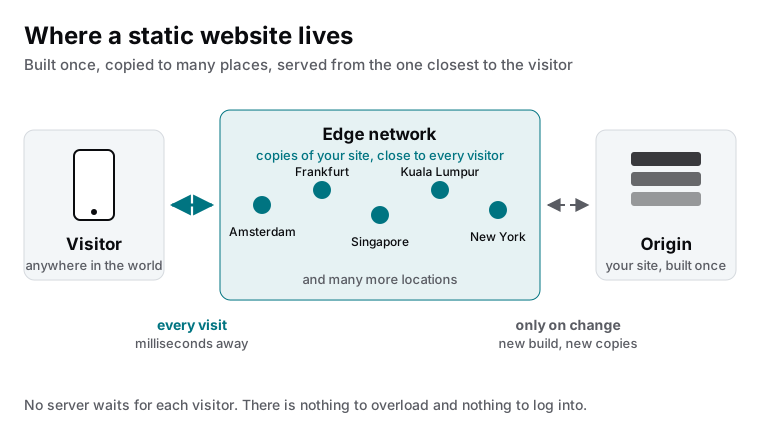
When someone types your domain, their device asks DNS where to go. DNS points to the CDN. The CDN location nearest to that visitor already has a copy of the page and returns it in a few milliseconds. The origin is only involved when you publish a change: a new build produces new files, and the copies are refreshed.
This is why a modern business website does not go down when a newsletter sends ten thousand people to it at once. There is no single machine doing the work.
Why sites actually go down
In our experience the platform is not where the problem sits. The problems are administrative:
| What happened | What it looked like | Who could have prevented it |
|---|---|---|
| Domain renewal failed on an old credit card | Site and email offline on a Monday | Whoever owns the registrar account |
| A DNS record was deleted during a migration | Website fine, email gone for two days | Whoever made the change, with a checklist |
| Hosting was in a former employee’s name | Nobody could log in to fix a broken form | The business, by owning the account |
| Certificate did not renew on old hosting | ”Not secure” warning for every visitor | Modern hosting renews automatically |
What a good setup looks like
- Domain at a reputable registrar, in the company’s name, with two-factor authentication and auto-renew on a card that will not expire.
- DNS managed in one place, documented, with email records (SPF, DKIM, DMARC) set correctly.
- Hosting on a platform that builds the site, copies it to a CDN, renews certificates automatically and offers preview deployments.
- Your web partner has access to all of it, and none of it is in their name.
What this means for you
You do not need to understand servers. You need to know which five accounts your website depends on, whose name is on them, and who is responsible for each. Everything else, from speed to uptime, follows from a platform choice your partner can explain in one conversation.

Founder and CEO of CivSec S.M.A.R.T, and responsible for everything we publish in this knowledge base.
How this article was made: researched and drafted with the help of AI tools, working from the sources listed below, and checked before publication. How we write.
Last updated . Spotted something outdated? Tell us.
Frequently asked questions
Is hosting the same as a domain?
No. The domain is the name people type. Hosting is where the files of the website are stored and served from. You can move hosting without changing the domain, and you can move the domain to another registrar without touching the hosting, as long as DNS is updated correctly.
What is DNS and why does it break websites?
DNS translates your domain name into the location of your website and your email servers. It is a small set of records, and one wrong or missing record can take down the site or stop email. Most DNS problems appear right after a migration or a domain transfer.
Does it matter in which country my website is hosted?
For speed, less than it used to, because a CDN serves copies from a location near each visitor. For legal reasons it can matter where data is stored and processed, especially for forms and customer data. Ask where the origin and the form data live, not just the marketing name of the platform.
What does a CDN do?
A content delivery network keeps copies of your website in many locations worldwide and serves each visitor from the nearest one. It also absorbs traffic spikes and many attacks before they reach your origin. For a static site, the CDN is effectively the hosting.
Sources
- Cloudflare Learning Center: What is a CDN? (accessed 2026-09-11)
- Cloudflare Learning Center: What is DNS? (accessed 2026-09-11)