What is HSTS and why does your website need it?
HSTS tells browsers to only ever load your site over HTTPS. Here is what it does, what can go wrong, and how to switch it on safely.
 By Shalena Opbroek, Founder and CEO
The short answer
HSTS stands for HTTP Strict Transport Security. It is a single line your web server adds to its responses. That line tells the visitor’s browser: for this domain, only ever use HTTPS, and keep doing that for the next so many seconds.
The result is simple. Even if someone types your address without the “s”, clicks an old http:// link, or is on a network that tries to downgrade the connection, the browser goes straight to the encrypted version. It does not ask, it does not try HTTP first.
Why a certificate alone is not enough
A business website already has a certificate and redirects HTTP to HTTPS. That feels safe, and it mostly is. But the redirect itself has a weak spot: the very first request still travels over plain HTTP before the redirect happens.
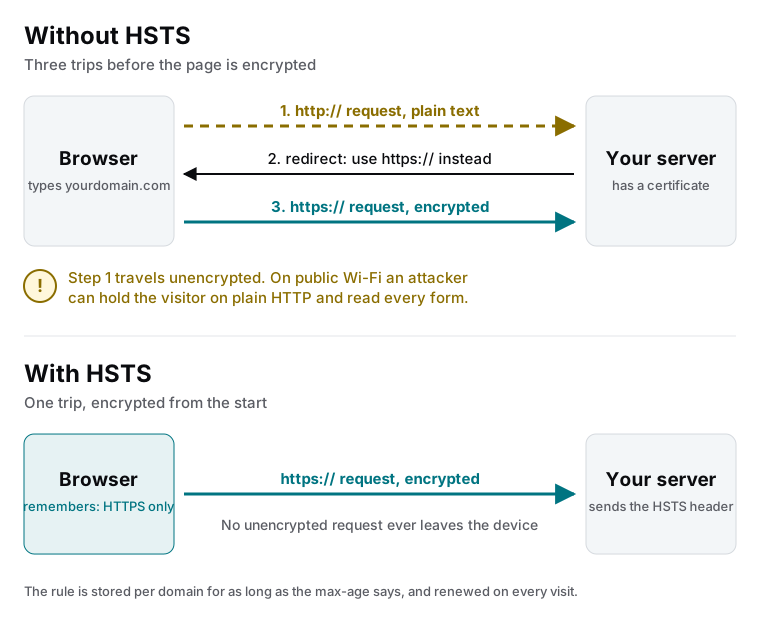
On a hostile network, such as public Wi-Fi, an attacker can sit in the middle of that first request and keep the visitor on an unencrypted copy of your site. This is called SSL stripping. The visitor sees your pages, types into your forms, and never notices the padlock is missing.
HSTS removes that first unencrypted request. Once a browser has seen the header, it rewrites every future HTTP request to HTTPS before it leaves the device.
What the header looks like
A typical setting is:
Strict-Transport-Security: max-age=31536000; includeSubDomains; preload| Part | What it does |
|---|---|
max-age | How long, in seconds, the browser should remember the rule. 31536000 is one year. |
includeSubDomains | Extends the rule to everything under your domain, such as shop.yourdomain.com or mail.yourdomain.com. |
preload | Signals that you want to be added to the list that ships inside browsers, so even a first-time visitor is protected. |
How to enable it safely
- Check that everything already loads over HTTPS. Pages, images, scripts, forms, embeds. Mixed-content warnings must be gone before you continue.
- Check every subdomain you use. If one of them still runs on HTTP, do not add
includeSubDomainsyet. - Start with a short max-age. For example 300 seconds. Use the site normally for a few days and watch for anything that breaks.
- Raise the max-age to a year. Once nothing broke, set 31536000 and add
includeSubDomainsif step 2 was clean. - Consider the preload list last. Submission is voluntary and removal takes months, so treat it as permanent.
What this means for you
If your website handles logins, forms, or payments, HSTS is not optional. It is one of the first things a security scan checks, and it is one of the cheapest fixes on the list. If you run a marketing site with no forms at all, it is still worth doing: it protects your visitors and it removes a finding that would otherwise show up in every audit.
Not sure whether your site sends the header? A quick security scan tells you in a day, together with the other headers that browsers expect.

Founder and CEO of CivSec S.M.A.R.T, and responsible for everything we publish in this knowledge base.
How this article was made: researched and drafted with the help of AI tools, working from the sources listed below, and checked before publication. How we write.
Last updated . Spotted something outdated? Tell us.
Frequently asked questions
Is HSTS the same as having an SSL certificate?
No. A certificate lets your site serve HTTPS. HSTS is a separate header that tells browsers they must use HTTPS for your domain from now on, so they never try HTTP first. You need the certificate before HSTS makes sense.
Can HSTS break my website?
Yes, if you enable it while some part of the site still only works over HTTP. Browsers will then refuse to load that part for as long as the max-age lasts. That is why you test with a short max-age first and only include subdomains when they are all on HTTPS.
Do I need the HSTS preload list?
Not to start. Preloading bakes your domain into the browsers themselves, which protects even the first-ever visit. It is the strongest setting, but it is hard to undo, so treat it as the final step once you are certain your whole domain will stay HTTPS-only.
How do I check whether my site has HSTS?
Open your browser's developer tools, load your homepage, and look for a Strict-Transport-Security line in the response headers. If it is not there, your site does not send it. A security scan will flag the same thing.
Sources
- MDN Web Docs: Strict-Transport-Security header (accessed 2026-09-11)
- OWASP Cheat Sheet: HTTP Strict Transport Security (accessed 2026-09-11)
- HSTS preload list submission (accessed 2026-09-11)