What to do in the first hour after your website is hacked
Contain, preserve, assess, recover, in that order. The first hour after a hack decides whether you learn how they got in, or whether they come back next month.
 By Shalena Opbroek, Founder and CEO
The short answer
The first hour after discovering a hack has four jobs, in a fixed order: contain the damage, preserve the evidence, assess what happened, and recover cleanly. The order matters more than speed. Doing them in the wrong order, and cleaning first is the usual wrong order, means you never learn how they got in, so they come back.
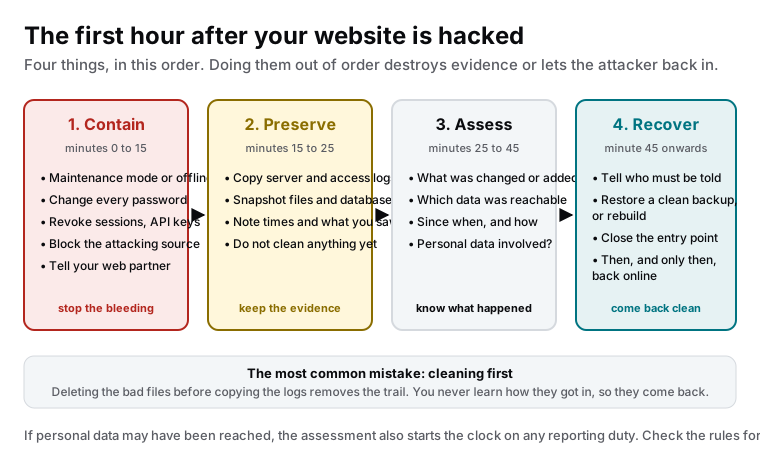
Minutes 0 to 15: contain
- Put the site in maintenance mode or take it offline. A hacked site can serve malware or phishing to your visitors under your name. Stop that first.
- Change every password on the site admin, the hosting, the database, the domain and the email accounts used for recovery. Assume the attacker has read them.
- Revoke sessions and API keys. Log out every user, rotate every key the site uses for integrations.
- Block the obvious source if the logs show one, at the firewall or CDN.
- Tell your web partner. This is what the monthly fee is for.
Minutes 15 to 25: preserve
Copy the server logs, access logs and any application logs to a safe location. Take a snapshot of the files and the database as they are now, hacked. Write down what you saw and when: the message, the redirect, the strange admin user, the time you noticed. This is the material that answers the only question that prevents a repeat: how did they get in.
Minutes 25 to 45: assess
With the evidence safe, look at what happened:
| Question | Where to look |
|---|---|
| What was changed or added? | File modification times, unknown files, new admin users, changed pages |
| How did they get in? | Access logs around the first change, plugin versions, login attempts |
| Since when? | The earliest suspicious log entry; often weeks before you noticed |
| What data was reachable? | What the site stores: form submissions, customer records, orders |
| Was personal data involved? | If yes, the reporting question starts now |
If personal data may have been reached, EU data protection rules can require notifying the supervisory authority within a short window and, in some cases, the people affected. Make the assessment factual and fast so that decision is based on evidence, and check the rules for your situation.
Minute 45 onwards: recover
- Tell who must be told. Your partner, your hosting provider if relevant, and anyone the assessment says must be informed.
- Restore from a clean backup from before the entry, or rebuild if none exists or the entry was too long ago.
- Close the entry point. Update or remove the plugin, enforce two-factor, remove the exposed admin, fix the form. Without this step, the restore is temporary.
- Harden before going live. New credentials everywhere, security headers, a scan of the restored site.
- Go back online, and watch. Monitoring on, logs reviewed daily for a while.
What this means for you
Print the order: contain, preserve, assess, recover. If it happens, follow it even when every instinct says to clean up first. And use the quiet time now to make the first hour easier: a tested backup, monitoring, two-factor on every login, and a platform where the public site has as little to hack as possible.

Founder and CEO of CivSec S.M.A.R.T, and responsible for everything we publish in this knowledge base.
How this article was made: researched and drafted with the help of AI tools, working from the sources listed below, and checked before publication. How we write.
Last updated . Spotted something outdated? Tell us.
Frequently asked questions
Should we take the site offline? We will lose visitors.
A hacked site is already losing you visitors, and worse: it may be serving them malware, spam or a phishing page under your name, and search engines will flag it. A maintenance page for an hour is a small price. Contain first.
Can we just delete the bad files and carry on?
You can, and the attacker will be back within days, because the way in is still open and you did not find it. Deleting first also removes the logs and files that show how it happened. Copy everything first, then clean, then close the entry point, then restore.
Who do we need to tell?
Your web partner or developer immediately. Your hosting provider if their systems are involved. If personal data of customers or staff may have been reached, data protection rules in the EU can require notifying the authority within a short window, and sometimes the people affected. Get the assessment done fast so that decision is made on facts.
How do we prevent the next one?
Find and close the entry point, which is usually an outdated plugin, a weak or reused password, or an exposed admin. Then reduce what can be attacked: fewer plugins, two-factor on every login, security headers, regular scans, and a platform where the public site has no server-side code to exploit.
Sources
- OWASP Top Ten (accessed 2026-09-11)
- European Commission: Data protection in the EU (accessed 2026-09-11)