Email spoofing: what SPF, DKIM and DMARC do for your domain
Three DNS records decide whether your email is trusted or spoofed. What SPF, DKIM and DMARC each do, in plain terms, and the order to set them up.
 By Shalena Opbroek, Founder and CEO
The short answer
Email was designed without a way to prove who sent a message. Anyone can put your domain in the “from” field. Three DNS records fix that: SPF says which servers are allowed to send for your domain, DKIM adds a signature that proves a message was not altered, and DMARC tells receiving servers what to do when a message fails those checks, and sends you reports about it.
Without them, your domain can be used for phishing, and your own legitimate email is treated with more suspicion by every receiver.
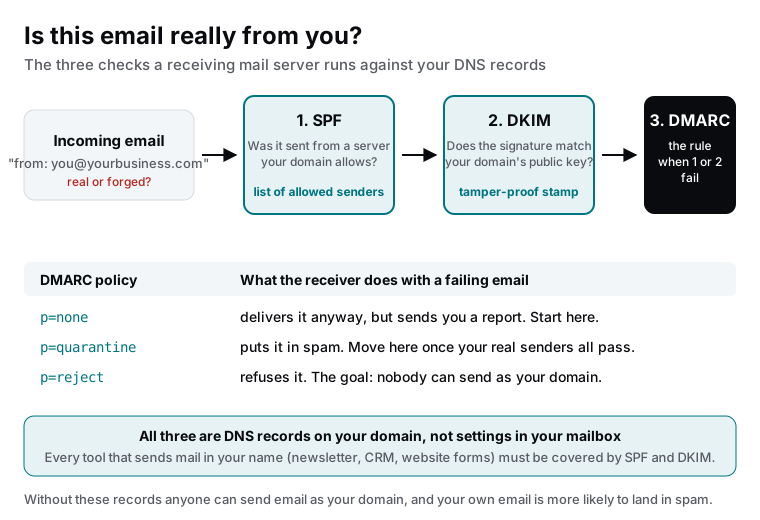
The three records
The order to set them up
- List every sender. Your mail provider, newsletter tool, CRM, invoicing, helpdesk, website form service, calendar tool. Anything that sends email with your domain in the from address.
- Publish SPF including all of them. One record, kept under the lookup limit, updated whenever a tool is added or removed.
- Enable DKIM in each sending tool and add each tool’s public key to your DNS. Tools give you the record to copy.
- Publish DMARC with policy none and a reporting address. Nothing changes for delivery yet; you start receiving reports.
- Read the reports for a few weeks. Every legitimate sender that fails is a tool you missed in steps 2 and 3. Fix them.
- Move to quarantine, then reject. Once the reports show only your real senders passing, tighten the policy. Reject is the goal: nobody can send as your domain.
What the reports tell you
DMARC reports arrive as machine-readable summaries from receivers: which servers sent email as your domain, how many messages, and whether they passed. Two things show up that nobody expected: a legitimate tool someone signed up for without telling IT, and unknown servers sending as your domain, which is spoofing in progress. Both are worth knowing.
What this changes for your business
- Phishing that uses your exact domain is rejected by the receivers that check, which is most large providers.
- Your own email lands in inboxes more reliably, because receivers can verify it.
- You get visibility into every service that sends in your name, which is usually more than anyone thought.
What this means for you
Ask one question this week: does our domain have a DMARC record, and who reads the reports? If the answer is no, the setup above is a few hours of work spread over a few weeks of monitoring, and it removes one of the easiest ways to abuse your company’s name.

Founder and CEO of CivSec S.M.A.R.T, and responsible for everything we publish in this knowledge base.
How this article was made: researched and drafted with the help of AI tools, working from the sources listed below, and checked before publication. How we write.
Last updated . Spotted something outdated? Tell us.
Frequently asked questions
We have a mail provider. Doesn't that handle this?
Your provider handles its own servers. It does not know about the newsletter tool, the CRM, the invoicing software and the website form service that also send email as your domain. Each of those must be added to SPF and set up with DKIM, otherwise their email fails the checks or, worse, you set DMARC to reject and your own invoices bounce.
Is DMARC dangerous to switch on?
Only if you skip the monitoring stage. Start with a policy of none, read the reports for a few weeks, fix every legitimate sender that fails, then move to quarantine and finally reject. Done in that order it is safe; done in one step it can block your own email.
Can these records stop all phishing that uses our name?
They stop email that claims to be from your exact domain from being accepted by receivers that check, which is most of them. They do not stop look-alike domains, such as your name with a letter swapped. That is a separate problem, handled by monitoring and takedowns.
How do I know if ours are set up?
Look up the TXT records on your domain, or ask your web partner for a check. A DMARC record exists or it does not, and its reports tell you exactly which senders pass and fail. If nobody in your company has ever seen a DMARC report, the answer is almost certainly no.
Sources
- Cloudflare Learning Center: DMARC, DKIM and SPF (accessed 2026-09-11)
- DMARC.org: Overview (accessed 2026-09-11)