Why your contact form gets spam, and the three layers that stop it
Form spam is bots, and bots are predictable. A honeypot, a rate limit and a silent browser check stop nearly all of it without making humans solve puzzles.
 By Shalena Opbroek, Founder and CEO
The short answer
Your form gets spam because a bot found it. Bots crawl the web looking for anything that looks like a form, and they submit to everything they find: fake enquiries, links to dubious shops, sometimes attempts to abuse the form itself. The volume feels personal. It is not.
The good news is that bots are predictable, and three cheap layers stop nearly all of them without asking a human to click on traffic lights.
Layer 1: the honeypot
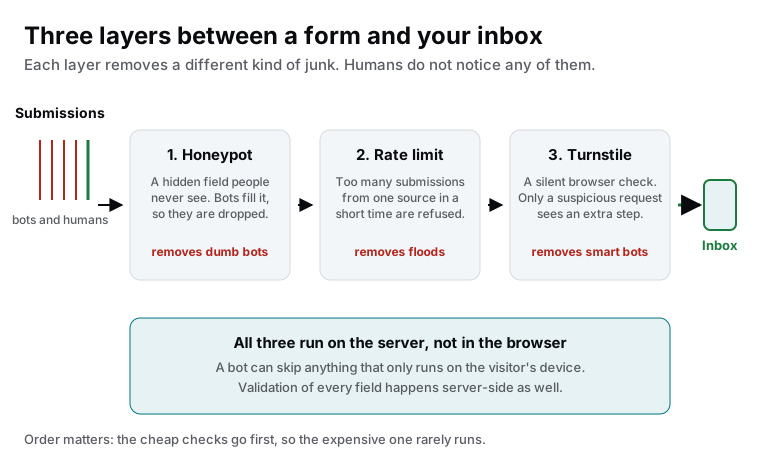
A field that is in the form’s code but invisible to people. Humans never see it, so they never fill it in. Most bots fill in every field they find. Any submission with something in the hidden field is dropped, silently.
It removes the dumb, high-volume bots, which are most of them. It costs nothing, needs no third party and never bothers a real visitor.
Layer 2: the rate limit
A single source that submits ten times in a minute is not a customer. The server counts submissions per source over a short window and refuses anything above a sensible limit. Real visitors never reach it; scripts hit it immediately.
Layer 3: the silent check
For whatever gets past the first two layers, a modern verification such as Cloudflare Turnstile runs a check in the background when the form loads. It looks at how the browser behaves, not at who the visitor is, and only shows a visible step when something looks off. Most humans never see anything.
This replaces the classic captcha, and it is the layer we would drop first if it ever became annoying. In practice it rarely triggers, because layers one and two have already done the work.
The rule that makes all three work
This is also why “the plugin says it is protected” is not enough. Ask where the check runs. If the answer is “in the page”, you have a decoration, not a filter.
What spam tells you about your form
A spam wave is a free security test. Look at what the bots tried:
- Links and HTML in text fields: is that escaped before it lands in an email or a database?
- Email addresses in the name field: can the form be used to send mail to arbitrary recipients?
- Files with odd extensions: is the upload checked by type and size on the server?
- Very long values: does the form fail cleanly, or does it show an error page with technical details?
If any of those answers worries you, the fix belongs with the form’s validation, and a security scan will show what else is exposed.
What this means for you
Stop the spam with the three layers, in this order, on the server. Then use the wave as a prompt to check how the form handles bad input, because the same bots that fill your inbox are the ones that probe for real weaknesses.

Founder and CEO of CivSec S.M.A.R.T, and responsible for everything we publish in this knowledge base.
How this article was made: researched and drafted with the help of AI tools, working from the sources listed below, and checked before publication. How we write.
Last updated . Spotted something outdated? Tell us.
Frequently asked questions
Why did the spam suddenly start?
Your form was added to a list. Bots scan the web continuously, record every form they find, and share those lists. Once you are on one, submissions arrive from many sources for years. It says nothing about your site being targeted personally.
Will a captcha solve it?
A classic picture captcha stops some bots and annoys every human, including the customer who was about to send you a real request. Modern silent checks reach a similar result without the puzzle, and a honeypot plus rate limit removes most of the volume before any check is needed.
Can I just add a question like "what is 2 plus 3"?
It helps against the dumbest bots for a while and stops working as soon as a bot is pointed at your form specifically. It also fails for some visitors with accessibility needs. Use it as a temporary measure at most.
Is form spam dangerous or only annoying?
Mostly annoying, sometimes dangerous. Spam submissions test whether your form can be abused to send email to others, whether uploads are checked, and whether error messages leak information. Treat a spam wave as a reason to check the form's server-side validation, not just the inbox.
Sources
- Cloudflare Developers: Turnstile (accessed 2026-09-11)
- OWASP Cheat Sheet: Input Validation (accessed 2026-09-11)