Deploying a website: what happens between "publish" and "live"
You approve a change and minutes later it is live. The six steps in between, and how they keep visitors from ever seeing a half-finished site.
 By Shalena Opbroek, Founder and CEO
The short answer
You approve a change, and a few minutes later it is live. In between, six things happen: the change is committed with an author and a message; a clean build server installs everything and builds the whole site; automated checks run and stop the process if anything fails; the result is uploaded as a new, numbered version that never overwrites the old one; traffic is switched to the new version in a single atomic step; and edge caches drop their old copies. If any step fails, visitors keep seeing the previous version. Every version is kept, so going back is the same switch in the other direction.
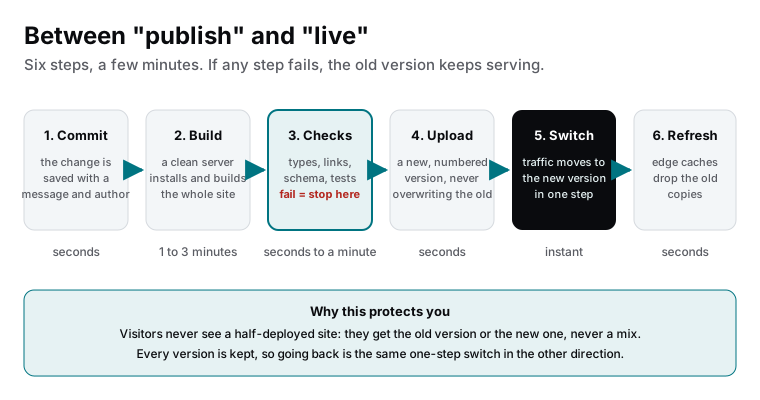
The six steps
| Step | What happens | Why it exists |
|---|---|---|
| 1. Commit | The change is saved in version control with who, when and why | A complete history; nothing changes anonymously |
| 2. Build | A clean server installs dependencies and builds the entire site | The result is complete and reproducible, not dependent on someone’s laptop |
| 3. Checks | Types, schema, links, tests, whatever the project defines | A broken build never reaches visitors |
| 4. Upload | The built files become a new immutable version with its own address | Nothing is overwritten; every version can be inspected and restored |
| 5. Switch | Production traffic moves to the new version in one step | Visitors see the old site or the new site, never a mix |
| 6. Refresh | Edge caches invalidate the old copies | The new version is what the network serves everywhere within seconds |
Why the old way broke sites
- Files copied onto a running server meant visitors could load a page whose stylesheet had been replaced but whose HTML had not, for the seconds or minutes the copy took.
- No clean build meant the site depended on whatever was installed on the server, and a server change broke it.
- No checks meant a typo in a template took the site down the moment the file landed.
- Overwriting meant the previous version was gone; recovery was a backup restore, if the backup was recent.
- No history meant nobody knew what changed, when or by whom.
What you notice
Very little, which is the point. A preview link when a change is proposed. A note that it is live a few minutes after approval. In the rare case where something slipped through, a rollback within a minute and an explanation afterwards. The machinery is there so that publishing a change to your website is as unremarkable as saving a document.
What this means for you
Between “publish” and “live” is a short, deliberate sequence that guarantees visitors only ever see a complete, checked version of your site, and that any version can be brought back in seconds. It costs a few minutes per change and removes the way websites used to break. If your site is still updated by copying files, that is the first thing to change.

Founder and CEO of CivSec S.M.A.R.T, and responsible for everything we publish in this knowledge base.
How this article was made: researched and drafted with the help of AI tools, working from the sources listed below, and checked before publication. How we write.
Last updated . Spotted something outdated? Tell us.
Frequently asked questions
Why does a deploy take a few minutes for a one-word change?
Because the whole site is rebuilt from scratch on a clean server and checked, so that the version going live is complete and consistent, not a live server with one file swapped. The minutes buy the guarantee that what you approved is exactly what visitors get, with a version to go back to.
Can visitors see a broken page during the switch?
Not on a platform with atomic deploys. Traffic points at the complete old version until the complete new version is ready, then switches in one step. Visitors get one or the other, never a mixture. Copying files onto a running server, the old way, is where half-updated pages came from.
What is the difference between a deploy and a release?
A deploy puts a version onto the infrastructure. A release makes it the one visitors see. On modern platforms every change is deployed to a preview link; only approved ones are released to production. The two words separate testing from publishing.
Sources
- Vercel documentation: Deployments (accessed 2026-09-11)