Rollbacks: how to undo a bad deploy in one minute
A broken change should cost a minute, not an evening. What a rollback is, why it needs every deployment kept, and how it changes the way changes get made.
 By Shalena Opbroek, Founder and CEO
The short answer
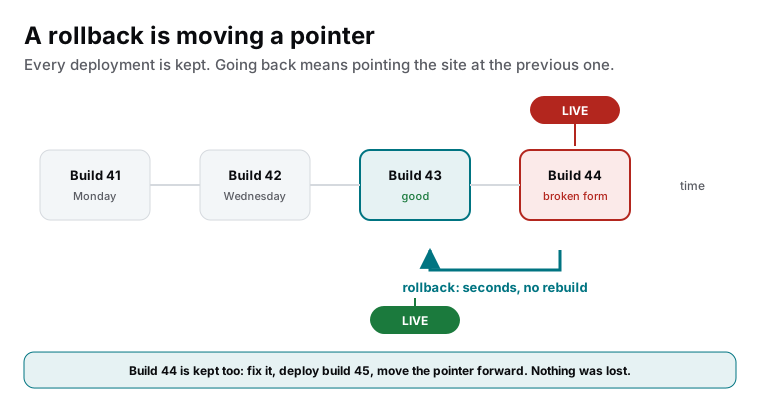
A rollback is the fastest fix in web operations: a bad change went live, so you point the live site back at the previous deployment. It takes seconds, it rebuilds nothing, and it works because every deployment is kept as a complete, unchangeable build that was never deleted. The broken build is kept too, for the fix. Visitors see the good version again while you find out what went wrong.
It only exists on setups that keep every deployment. That is a property of the platform, and it changes how safe every change is.
The same mechanism is what makes a platform switch fast. When we moved our own site between hosting projects in September 2026, the switch itself took four seconds, because DNS never changed: the domain kept pointing at the same provider and only the project behind it moved.
Why it works
| Traditional deployment | Immutable deployments |
|---|---|
| Files are overwritten on the server | Each deployment is a new, complete build |
| The previous version is gone unless backed up | Every previous build still exists |
| Undo means restoring a backup: slow, risky | Undo means moving a pointer: seconds, safe |
| A bad deploy is an incident | A bad deploy is a click |
| Changes are made cautiously and rarely | Changes are made often, because they are cheap to undo |
What it changes about making changes
When undo costs seconds, changes stop being frightening. Small improvements ship weekly instead of piling up into a risky quarterly release. A problem found after launch is rolled back, fixed on a preview, and redeployed, without visitors noticing. The whole rhythm of running a site becomes calmer.
When a rollback is not enough
Code is rolled back instantly; data is not. On an application with a database, a change that alters the data structure has to be made backward-compatible first, so the previous build still works with the current data after a rollback. That is a planning discipline for applications. On a static site there is no database in the deployment, and a rollback is complete on its own, which is one more reason business websites belong on static builds.
What this means for you
If your site cannot be rolled back in a minute, every deployment is a bet with an evening of repair as the downside, and that fear is why changes happen rarely and in bulk. A platform that keeps every deployment makes undo trivial, changes frequent, and incidents short. It is one of the quiet properties that decides whether a website is a source of stress or not.

Founder and CEO of CivSec S.M.A.R.T, and responsible for everything we publish in this knowledge base.
How this article was made: researched and drafted with the help of AI tools, working from the sources listed below, and checked before publication. How we write.
Last updated . Spotted something outdated? Tell us.
Frequently asked questions
Is a rollback the same as restoring a backup?
No. A backup restore rebuilds the site from stored data and can take hours. A rollback switches the live pointer to a previous build that already exists and is already deployed. Seconds, no data handling, no risk. Backups are for disasters; rollbacks are for bad changes.
What about the database when we roll back?
Rolling back code does not roll back data, which is why changes that alter data structures are planned differently: made backward-compatible first, so the previous build still works with the current data. For a static site there is no database in the deployment, and a rollback is complete on its own.
Can we roll back on our current hosting?
If deployments overwrite files on a server, usually not, or only by restoring a backup. Modern platforms keep every deployment as an immutable build and offer rollback as a button. If yours cannot, that is one of the strongest reasons to move.
Sources
- Vercel documentation: Instant rollback (accessed 2026-09-11)