Staging environments: why changes should never go straight to live
A change should be seen working somewhere safe before visitors see it. What local, preview, staging and production each do, and when staging is worth having.
 By Shalena Opbroek, Founder and CEO
The short answer
A change to a website or an app should be seen working somewhere safe before visitors see it. That is the whole idea behind environments. A developer makes the change on their own machine, a preview shows it on real infrastructure for approval, an optional staging copy tests it against production-like data and integrations, and production is the live site that only ever receives an approved build. For a static website, previews and production are usually enough. For software with a database and integrations, staging earns its place.
The rule underneath all of it: nobody edits production directly.
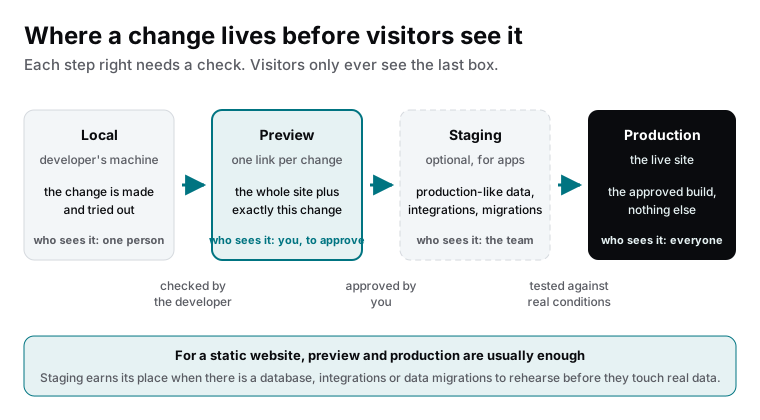
The four environments
| Environment | What it is | Who sees it | What is checked |
|---|---|---|---|
| Local | The developer’s own machine | One person | Does the change work at all |
| Preview | A copy of the whole site with exactly this change, on the real infrastructure, at its own link | You, to approve | Does it look and behave right, on a phone, before it is live |
| Staging | A long-lived copy of the app with production-like data and connected integrations | The team | Does it behave against realistic conditions: data, migrations, third-party services |
| Production | The live site | Everyone | Nothing new: only approved builds arrive, and each can be rolled back |
When previews are enough, and when staging is needed
- A static or content website: previews and production. Each change has a link; you approve on your phone; the pipeline deploys the approved build. Staging would add a step without adding safety.
- A site with a form and a few functions: still previews, with the functions pointed at test endpoints in preview so a test submission never lands in the real inbox or CRM.
- An application with a database: staging. Migrations must be rehearsed against production-like data; integrations with payment, accounting or email providers must be exercised in their test modes; background jobs must run once end to end.
- Anything regulated or high-stakes: staging plus a written release checklist, because the cost of a bad release is not a broken page but a broken process.
What good looks like in practice
- Every change, however small, goes through the same path. No exceptions for “just a text fix”, because those are the changes that break sites at 5 p.m. on a Friday.
- Previews are shared as links and approved on a phone, since that is where most visitors are.
- Production deploys are atomic and reversible: the previous build is one action away.
- Staging, where it exists, is refreshed from anonymised production data regularly, so it does not drift into a fantasy version of the app.
What this means for you
If your website changes go straight to live, you are gambling with every edit, and the odds catch up. Ask for previews per change and a production that only receives approved builds. If you run software with data and integrations, ask for staging with anonymised data and a rehearsed release path. The environments are not bureaucracy; they are the difference between a change you can undo and an outage in front of customers.

Founder and CEO of CivSec S.M.A.R.T, and responsible for everything we publish in this knowledge base.
How this article was made: researched and drafted with the help of AI tools, working from the sources listed below, and checked before publication. How we write.
Last updated . Spotted something outdated? Tell us.
Frequently asked questions
Our current agency edits the live site directly. Is that a problem?
Yes. Every edit is a small gamble with no rehearsal and no undo. It works until the day a plugin update, a theme change or a typo in a setting takes the site down in front of customers. A preview or staging step costs minutes and removes that gamble.
Do we need staging for a brochure website?
Usually not, if the site is built and deployed properly. Preview deployments give every change its own link on the real infrastructure, which is what staging used to be for. Staging is for apps with data and integrations where the concern is behaviour against real conditions, not how a page looks.
What data should staging contain?
Production-like data that is not production data: anonymised copies, generated test data, or a subset with personal details removed. Real customer data in staging is a privacy and security problem, because staging is usually less protected than production.
Sources
- Vercel documentation: Deployment environments (accessed 2026-09-11)