How to move your domain without breaking email or the website
Most domain and DNS moves break email, not the website. The five-step order that keeps both working, the record everyone forgets, and how to verify properly.
 By Shalena Opbroek, Founder and CEO
The short answer
Moving a domain to a new registrar, or moving its DNS to a new provider, is a routine job that goes wrong in a routine way: the website records are set because that was the project, and the email records are forgotten because they belonged to nobody. The site works, the inbox goes quiet, and nobody notices for a day.
The fix is an order of operations, not a skill.
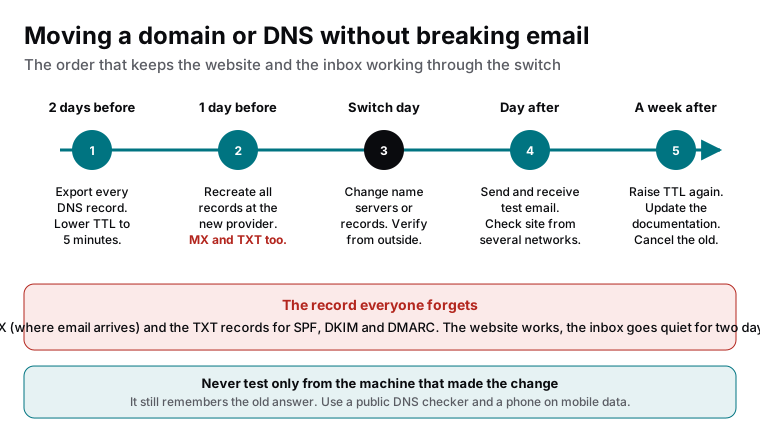
The five steps
- Two days before: export and lower TTL. Export the complete record table from the current provider and store it with your documentation. Lower the TTL on every record to a few minutes, so the switch propagates fast when it happens.
- One day before: recreate everything at the new provider. Every record, not just the website ones. A and AAAA for the site, CNAME for www, MX for email, TXT for SPF, DKIM, DMARC and any verification records, CAA if present. Compare line by line with the export.
- Switch day: change and verify from outside. Update the name servers at the registrar, or the records at the provider, depending on what is moving. Then verify with a public DNS checker and a phone on mobile data, not from the office machine.
- Day after: test what matters. Send and receive email from an outside address. Open the site from several networks. Check that forms still send and that certificates renewed.
- A week after: tidy up. Raise the TTL back to a sensible value, update the documentation, and cancel the old service only when everything has been confirmed working.
The record everyone forgets
| Forgotten record | What breaks | How long until someone notices |
|---|---|---|
| MX | Email stops arriving | Hours to days, because outgoing email still works |
| TXT for SPF and DKIM | Outgoing email lands in spam | Weeks, because nobody tells you |
| TXT for DMARC | Reports stop, spoofing protection weakens | Never, unless someone reads the reports |
| CNAME for www | The www version of the site fails | Quickly, if people type it |
| CAA | Certificate renewal fails | At the next renewal, as a “Not secure” warning |
Verifying properly
Your own computer and your office network remember the old answer for as long as the old TTL said. A change can look complete from your desk and be broken for everyone else. Use a public DNS checker that queries from many locations, and a phone on mobile data, and check the specific records: MX, TXT, A, CNAME. “The site loads” is not verification.
What this means for you
If a domain or DNS move is planned, ask whoever is doing it for the exported record table and the checklist before they start, and for the outside verification afterwards. If a move already happened and email has been strange since, compare the current records with what should be there; the missing MX or TXT line is usually found in minutes.

Founder and CEO of CivSec S.M.A.R.T, and responsible for everything we publish in this knowledge base.
How this article was made: researched and drafted with the help of AI tools, working from the sources listed below, and checked before publication. How we write.
Last updated . Spotted something outdated? Tell us.
Frequently asked questions
Do I have to move DNS when I move the domain to another registrar?
Not necessarily. You can transfer the domain and keep DNS where it is, if the DNS provider is separate from the old registrar. If the old registrar also hosted the DNS, the records must be recreated somewhere before the transfer completes, or everything points nowhere.
How long will email be down?
Zero, if the MX and TXT records exist at the new provider before the switch and the TTL was lowered in advance. Days, if they were forgotten and the old records are cached around the world. The whole method exists to make the first case the normal one.
Can we do this without downtime for the website?
Yes. With the new records in place before the switch and a low TTL, resolvers pick up the new answer within minutes and the site is served from both old and new during the overlap. The website is rarely the problem; email is.
Who should do the move?
Whoever runs your DNS, inside an account in your company's name, with a written checklist and a second person verifying from outside. It is not difficult; it is unforgiving of skipped steps.
Sources
- Cloudflare Learning Center: DNS records (accessed 2026-09-11)
- Cloudflare Learning Center: What is DNS? (accessed 2026-09-11)