Caching explained: why the second visit is faster
Caching keeps a copy closer to the visitor so the next request skips the trip to the source. The three layers, what TTL means, and why changes seem to lag.
 By Shalena Opbroek, Founder and CEO
The short answer
Caching is keeping a copy of something closer to the person who will ask for it, so the next request can be answered without going all the way back to the source. The first visit fetches the page from wherever it lives. The second visit is answered from a copy in the browser, or from a copy at a network location nearby, in a fraction of the time. Almost everything that makes the modern web feel fast is a cache somewhere.
It is also why “I changed it and I still see the old version” is the most common support question in web work.
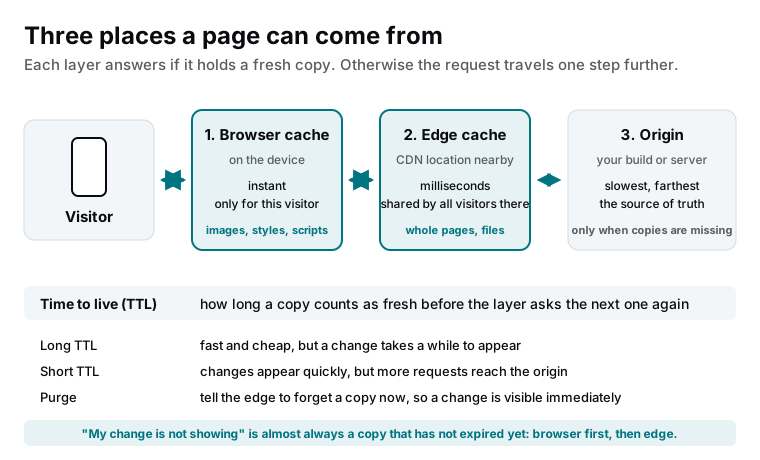
The three layers
| Layer | Where the copy lives | Who it serves | Typical contents |
|---|---|---|---|
| Browser cache | On the visitor’s device | That visitor only | Images, styles, scripts, fonts, sometimes pages |
| Edge cache | A CDN location near the visitor | Everyone near that location | Whole pages and files for a static site; files for a dynamic one |
| Origin | Your build output or your server | Everyone, as the source of truth | Everything; consulted only when copies are missing or stale |
Why the second visit is faster
On the first visit the browser fetches everything: the page, the styles, the scripts, the images and fonts. It keeps copies of the parts allowed to be cached. On the second visit it reads those copies from the device, which is faster than any network, and only asks for what it does not have or what has expired. The edge does the same job one level up, for every visitor in a region: the first request fills the copy, and thousands after it are served from it.
Why changes seem to lag
- The browser has a copy. Your own machine, which viewed the page an hour ago, shows its stored version. A hard refresh or a private window bypasses it.
- The edge has a copy. The nearby CDN location is still within the copy’s time to live. A purge, or waiting for expiry, clears it.
- A different layer than you think. The page updated but a style or image did not, because they have longer lifetimes. Versioned file names fix this for good.
- Someone else’s cache. A corporate proxy or a mobile carrier keeping its own copy. Rare, and outside your control, but it explains the one colleague who still sees the old page.
How a well-run site handles it
Files that never change once published, styles, scripts, images, get long lifetimes and versioned names, so a new version is a new file and the old copies simply stop being referenced. Pages get shorter lifetimes or are purged on publish. On a static site the whole thing simplifies: every page is a finished copy, made at build time, pushed to every edge location, and refreshed on the next publish. There is no origin server assembling pages, so the cache is not an optimisation layered on top; it is the hosting.
What this means for you
When a change does not appear, check another device before reporting a problem. When you plan a site, ask how long each kind of content is cached and how a change is pushed through. And when you choose a platform, prefer one where pages are finished copies served from the edge, because then every visit is the fast second visit.

Founder and CEO of CivSec S.M.A.R.T, and responsible for everything we publish in this knowledge base.
How this article was made: researched and drafted with the help of AI tools, working from the sources listed below, and checked before publication. How we write.
Last updated . Spotted something outdated? Tell us.
Frequently asked questions
I updated the page and I still see the old version. Is it broken?
Almost certainly not. Your browser is showing its own copy, or the edge location near you is. A hard refresh clears the browser copy; a purge or a short wait clears the edge. Check from another device or a private window before assuming the change failed.
Why not set every cache to a very short time?
Because then requests travel all the way to the origin again, which is slower for visitors and more expensive for you, and the point of the cache is lost. The right time depends on how often each thing changes: images and styles for a long time, pages for less, personal data not at all.
Does caching affect logged-in or personal pages?
Those must not be shared between visitors, so they are cached per user or not at all. A misconfigured cache that serves one customer's page to another is a serious incident. Shared caching is for content that is the same for everyone, which on a business site is nearly everything.
Sources
- MDN Web Docs: HTTP caching (accessed 2026-09-11)
- Cloudflare Learning Center: What is a CDN? (accessed 2026-09-11)