Cloudflare in front of your site: what it does, step by step
A network layer sits between every visitor and your site. What it does to each request, why most junk never reaches you, and what it does not replace.
 By Shalena Opbroek, Founder and CEO
The short answer
With Cloudflare in front of a site, every request from every visitor and every bot goes through Cloudflare’s network before it reaches the site. At a location near the visitor, the network answers the DNS query, handles the encrypted connection, checks the request against attack and bot rules, applies rate limits, serves a cached copy if it has one, adds security headers and handles redirects. Only what remains, and only what is not cached, travels on to your site. Junk traffic is dropped at the edge and never costs you anything.
It is the quiet layer that makes a small site behave like a large one.
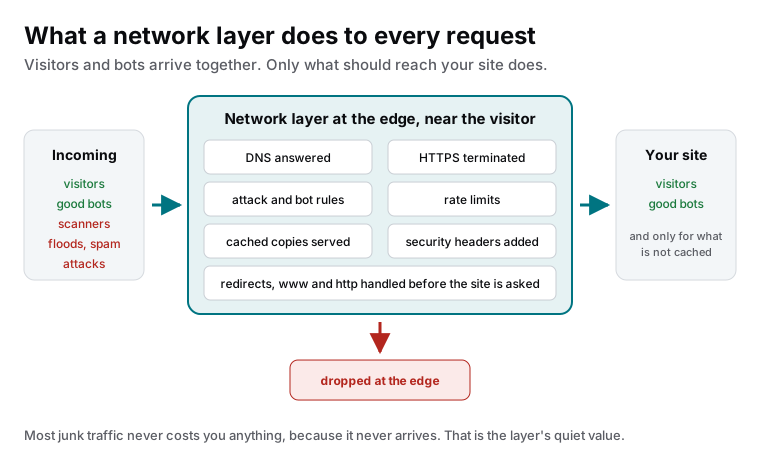
What happens to each request, in order
- DNS. The visitor’s device asks where your domain is; Cloudflare answers from the nearest location, fast, and points at itself.
- Connection. HTTPS is established at the edge with an automatically managed certificate. The visitor’s connection is short and local.
- Filtering. The request is checked against rules: known attack patterns, malicious sources, bot behaviour. Bad requests stop here.
- Rate limits. A source asking too fast, at a login or a form, is slowed or refused.
- Cache. If a fresh copy of what was asked for is at the edge, it is served immediately. For a static site that is most requests.
- Headers and redirects. Security headers are added; http to https and www rules are applied; nothing reaches the site that should have been redirected.
- Origin. Only what is left travels to your site, over an optimised connection, and the response is cached for the next visitor.
What it gives a small business
| Benefit | How |
|---|---|
| Speed everywhere | Copies and connections at the edge, near each visitor |
| Attack absorption | Floods and scanners dropped before they reach the site |
| Bot control | Rules that stop bad bots and allow good ones |
| Certificates without effort | Managed at the edge, renewed automatically |
| Consistent headers and redirects | Set once at the edge, applied to everything |
| One place for DNS | Fast changes, an API for automation, records exported |
| Visibility | Analytics on requests, threats and cache behaviour, without a script on the page |
Settings that need care
- Bot rules set too strictly have blocked search and AI crawlers on real sites. Allow the known good ones and check after every change.
- Cache rules must match the site: pages purged on publish, assets cached long, personal pages never cached.
- Account ownership in your company’s name with two-factor, because the account controls your DNS.
What this means for you
Putting a network layer like Cloudflare in front of a site is one of the highest-return, lowest-effort changes available: faster pages worldwide, attacks and bot noise gone before they cost anything, certificates and headers handled, DNS in one fast place. Set the rules deliberately, keep the account in your name, and keep maintaining the site behind it. The layer does the noise; the routine does the rest.

Founder and CEO of CivSec S.M.A.R.T, and responsible for everything we publish in this knowledge base.
How this article was made: researched and drafted with the help of AI tools, working from the sources listed below, and checked before publication. How we write.
Last updated . Spotted something outdated? Tell us.
Frequently asked questions
Is Cloudflare a hosting provider?
It can host static sites and run functions, but the role described here is the layer in front of whatever hosts your site: DNS, network, filtering, caching and headers. Many of our sites run on one platform with Cloudflare in front for DNS and protection; the two do different jobs.
Does it slow the site down by adding a step?
The opposite in practice. The step is at a location near the visitor, cached copies are served from there, connections are optimised, and junk requests never travel further. Sites get faster with the layer, not slower.
Can it block legitimate visitors or crawlers?
Misconfigured rules can. Bot protection set too aggressively has blocked search crawlers on some sites. Rules should be set deliberately, allow known good crawlers, and be checked after changes. It is a tool; the settings matter.
Sources
- Cloudflare developer documentation (accessed 2026-09-11)
- Cloudflare Learning Center: What is a CDN? (accessed 2026-09-11)