Headless Shopify with Astro: what it is and when it pays off
A fast custom storefront on Astro, with cart and checkout still on Shopify. How the pieces fit, what changes for shoppers and staff, and when not to do it.
 By Shalena Opbroek, Founder and CEO
The short answer
A standard Shopify store uses a theme: Shopify renders every page the shopper sees. A headless store keeps Shopify for everything behind the scenes, but the pages shoppers browse are built separately, in our case with Astro, and talk to Shopify through its Storefront API. When the shopper presses “pay”, they hand over to Shopify checkout as usual.
The reason to do it is speed and control. The reason not to do it is that it is a real development project, and a store gets most of the benefit from cheaper fixes first.
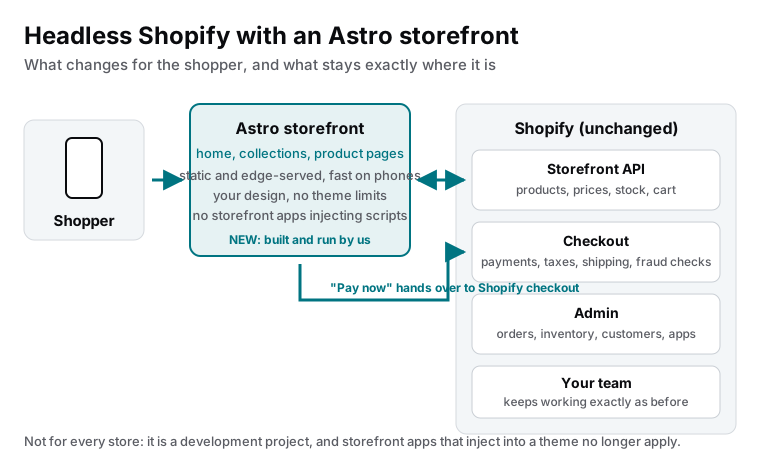
What changes, and what does not
| Part of the store | Standard theme | Headless with Astro |
|---|---|---|
| Home, collections, product pages | Rendered by Shopify’s theme engine | Built by us, served as static and edge-cached pages |
| Cart | Theme plus apps | A small island in the storefront, using the Storefront API |
| Checkout | Shopify | Shopify, unchanged |
| Products, stock, prices | Shopify admin | Shopify admin, unchanged |
| Orders, customers, fulfilment | Shopify admin | Shopify admin, unchanged |
| Design | Within theme limits | Anything, no theme constraints |
| Storefront apps (popups, review widgets) | Injected into every page | Not applicable; rebuilt where they earn their place |
| Speed on phones | Depends on theme and apps | Fast by construction |
Why it is fast
Product and collection pages change rarely compared with how often they are viewed. On Astro they are built as finished pages and served from the nearest edge location, so a shopper on a phone sees the product before any script has arrived. Only the parts that genuinely change per visitor, the cart count, the selected variant, live stock, run as small islands that fetch what they need after the page is on screen.
Compare that with a theme where ten apps each add a script to every page, and the difference is not tuning. It is structure.
When it pays off
- The cheap fixes are done. Apps audited, images resized, theme cleaned up. If not, do that first; we wrote a guide for it.
- The store has real volume. Enough orders that a measurable improvement in mobile speed or conversion pays for a development project.
- Speed or design is a proven limit. Core Web Vitals still fail on product pages, or the design your brand needs cannot be built inside the theme.
- Content matters. You want a fast blog, guides or landing pages next to the store, in one design, on one domain.
- You want ownership. The storefront is code you own, in a repository you can take anywhere, while Shopify keeps doing what it does best.
What your team notices
Almost nothing, which is the point. Products, prices, inventory, discounts, orders and customers are managed in the Shopify admin exactly as before. Changes appear on the storefront within minutes through an automatic rebuild or a live fetch, depending on the page. Checkout looks and behaves like Shopify checkout because it is Shopify checkout.
What this means for you
If your store is slow on phones, start with the clean-up guide. If it is still slow after that, or if the theme is fighting your design at every turn, headless with Astro is the next level: a storefront you own, fast by construction, with Shopify doing everything behind it.

Founder and CEO of CivSec S.M.A.R.T, and responsible for everything we publish in this knowledge base.
How this article was made: researched and drafted with the help of AI tools, working from the sources listed below, and checked before publication. How we write.
Last updated . Spotted something outdated? Tell us.
Frequently asked questions
Does headless mean I leave Shopify?
No. Shopify remains the system of record for products, inventory, customers, orders and checkout. Only the browsing experience, the pages a shopper sees before checkout, moves to a storefront we build. Your team's daily work in the admin does not change.
Do my Shopify apps still work?
Apps that work in the admin, in checkout or behind the scenes continue to work. Apps that inject widgets into the theme, such as review carousels or popups, do not apply to a headless storefront. Their functions are rebuilt into the storefront where they earn their place, which is also why headless stores are fast.
Why Astro and not Shopify's own Hydrogen?
Hydrogen is a solid choice and we can work with it. We prefer Astro because product and collection pages can be served as static, edge-cached pages with tiny islands for cart and variants, which is faster on phones and cheaper to run. For stores with heavy personalisation on every page, Hydrogen's server-first model can fit better.
What does a headless storefront cost to run?
Hosting for a static storefront is low and predictable. The larger cost is the build and its maintenance, which is why we only recommend it once a store has the volume to justify it. Before that, a well-tuned theme is the better investment.
Sources
- Shopify developer documentation: Headless storefronts (accessed 2026-09-11)
- Shopify developer documentation: Storefront API (accessed 2026-09-11)
- Astro documentation: Islands architecture (accessed 2026-09-11)