How to make your store faster on mobile (without a rebuild)
Online stores are slow on phones because of apps and images, not the platform. A practical order of fixes, from free to a headless rebuild.
 By Shalena Opbroek, Founder and CEO
The short answer
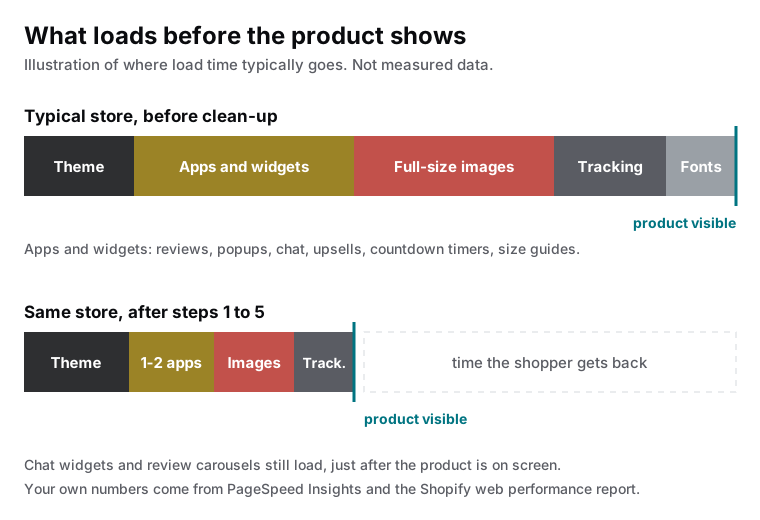
A slow Shopify store is slow because of what was added to it. They are slow because of everything bolted on top: apps that inject scripts into every page, images uploaded straight from a camera, sliders and popups that load before the product does. The fix is a matter of order. Measure, remove, resize, defer. A full rebuild is the last step, not the first.
Step 1: measure like a shopper, not like a developer
Open your store on a mid-range Android phone over mobile data, not on your office Wi-Fi. That is where most of your visitors are. Then run two checks:
- Google’s PageSpeed Insights, mobile tab, on your homepage, a collection page, and a product page. Product pages are where money is made and where apps pile up.
- Shopify’s own web performance report in your admin, which shows the same Core Web Vitals over time.
Write down the three numbers per page and compare them with Google’s published targets:
| Metric | What it measures | Good |
|---|---|---|
| Largest contentful paint (LCP) | Time until the main image or text block is visible | 2.5 seconds or less |
| Interaction to next paint (INP) | Delay between a tap and the page responding | 200 milliseconds or less |
| Cumulative layout shift (CLS) | How much the layout jumps while loading | 0.1 or less |
Step 2: audit your apps, then clean up after them
Every app that adds something to the storefront, such as reviews, upsells, popups, chat, size guides, or countdown timers, usually adds at least one script to every page. Ten apps can mean ten scripts fighting for the phone’s attention before your product image appears.
Go through the app list and ask, per app: does this make money, or did we install it once to try something? Remove what you do not use.
For the apps you keep, check whether they can load after the page is visible instead of before. Chat widgets and review carousels rarely need to be first.
Step 3: fix images, the quiet heavyweight
Product photos uploaded at full camera resolution are the single most common reason a mobile product page takes four seconds to show anything.
- Ask for the right size. Shopify can serve resized versions automatically. Make sure your theme requests the size the slot needs instead of the original.
- Use modern formats. Shopify handles conversion for you when the theme requests it correctly.
- Lazy-load everything below the first screen. The hero image should load immediately; the sixth product in a grid should not.
- Give every image fixed dimensions. That stops the page from jumping while pictures arrive, which is exactly what the layout shift score measures.
Step 4: look at the theme itself
Themes built for Online Store 2.0 are generally leaner than older ones and let you remove sections you do not use. If your theme is several years old and heavily customized, the weight is often in the customizations, not the base theme.
Common theme-level offenders: hero sliders with five slides, video backgrounds on mobile, three font families with several weights each, and animation libraries loaded on every page for one effect on the homepage. Each is a trade you can make consciously, but they get made by accident.
Step 5: keep third-party scripts on a short leash
Tracking pixels, analytics tags, review badges, and marketing tools each add network requests. Keep the ones that drive decisions, load them through a single tag manager where possible, and remove the pixels from campaigns that ended a year ago.
When the cheap fixes are not enough
After steps one to five, the targets on mobile are within reach. If yours does not, or if the design is fighting the theme at every turn, the next level is a headless storefront: a custom front end built on Astro that talks to Shopify’s storefront API, while cart and checkout stay on Shopify.
Headless gives you full control over speed and design. It also means apps that inject into the storefront no longer work, and it is a proper development project rather than a setting. That is why it only pays off for stores with real volume where speed is measurably costing sales.
What this means for you
Do steps one to three this month. They are free or cheap, and they usually move a store from slow to acceptable. Then decide, with numbers in hand, whether the theme needs work or whether a headless rebuild is the better investment. Either way, measure again afterwards on the same phone, so you know what actually changed.

Founder and CEO of CivSec S.M.A.R.T, and responsible for everything we publish in this knowledge base.
How this article was made: researched and drafted with the help of AI tools, working from the sources listed below, and checked before publication. How we write.
Last updated . Spotted something outdated? Tell us.
Frequently asked questions
Is Shopify itself slow?
No. Shopify's servers and checkout are fast. The slowness almost always comes from what gets added on top: theme features, apps that inject scripts, large images, and custom code left behind by previous developers.
Will removing an app really make my store faster?
Often yes, but uninstalling is not always enough. Many apps leave code in your theme files after removal. Check the theme code after uninstalling, or have someone do it, so the leftover scripts actually stop loading.
What is a good speed score for a Shopify store?
Look at Google's Core Web Vitals rather than a single score: largest content paint under 2.5 seconds, interaction to next paint under 200 milliseconds, and cumulative layout shift under 0.1, measured on mobile. Those are the thresholds Google publishes as good.
When does a headless storefront make sense?
When the store has meaningful traffic, the cheap fixes are done, and speed or design freedom is still holding conversion back. Headless means a custom front end on Astro talking to Shopify's storefront API, while checkout stays on Shopify. It is a project, not a setting.
Does store speed affect my Google ranking?
Google states that Core Web Vitals are used by its ranking systems, mostly as a tiebreaker between pages with similar content. The bigger effect is on shoppers: slow pages lose people before they see a product, and that shows up in conversion long before it shows up in rankings.
Sources
- Google web.dev: Web Vitals thresholds (accessed 2026-09-11)
- Shopify Help Center: Web performance (accessed 2026-09-11)
- Google Search Central: Understanding page experience in Google Search results (accessed 2026-09-11)