Static site generation versus server rendering: what it means for you
When is the page made: once when you publish, or every time someone visits? The difference decides speed, cost, security and what the site can do.
 By Shalena Opbroek, Founder and CEO
The short answer
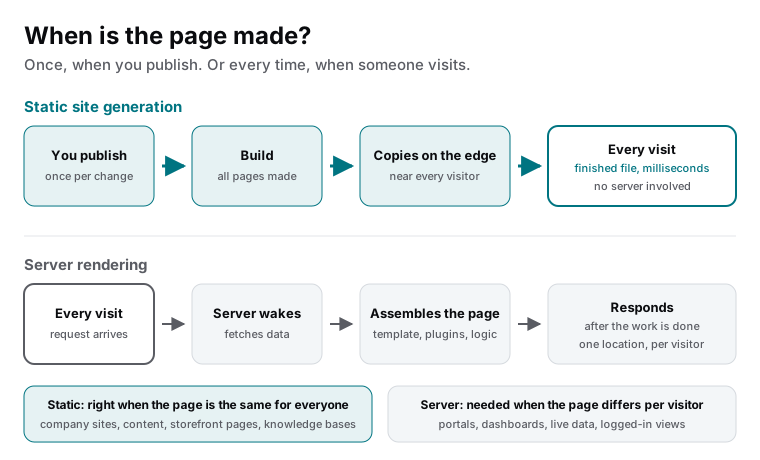
Every web page is made at some point from content and a template. The question is when. Static site generation makes every page once, at the moment you publish, and copies the finished files to a network that serves them from close to each visitor. Server rendering makes the page on each visit: a request arrives, a server fetches data, assembles the page and responds. The first is faster, cheaper and safer for pages that are the same for everyone. The second is necessary for pages that depend on who is asking or that change by the second.
A brochure or content site is entirely the first kind. A business application is mostly the second. Knowing which parts of your project are which is the whole decision.
Side by side
| Static generation | Server rendering | |
|---|---|---|
| When the page is made | Once, on publish | On every visit |
| Where it is served from | Edge locations worldwide | A server, usually in one region |
| Speed | Finished file, milliseconds | Depends on server, distance and load |
| Traffic spike | Absorbed | Server must keep up |
| Security surface | Files; nothing runs per visit | Code and database run per visit |
| Running cost | Low, flat | Server time, scales with traffic |
| Personal or live content | Through small functions or islands | Native |
| Right for | Company sites, content, landing pages, storefront pages, knowledge bases | Portals, dashboards, logged-in views, second-by-second data |
Choosing per page
The decision is not one per site. A modern project can generate its content pages statically and render its account area on the server, in one codebase. The question to ask of each page is simple: is this page the same for everyone who opens it? If yes, generate it once. If it depends on the visitor or must reflect this second’s data, render it on demand.
- List the page types. Home, services, articles, product pages, account, dashboard, checkout.
- Mark each as same-for-everyone or per-visitor. Most content is the first; most logged-in views are the second.
- Generate the first group statically. That is usually most of the site and all of its traffic.
- Render the second group on demand, or build it as an application if it is the core of the product.
- Add small dynamic pieces to static pages where needed: a cart count, a live price, a form. Islands and functions, not full server rendering.
What this means for you
Ask, for each part of your site, whether the page is the same for everyone. For the parts that are, static generation gives you speed, low cost and a small attack surface with no trade-off. For the parts that are not, server rendering or an application framework is the right tool. A business site discovers that it is entirely in the first group, and that discovery is what makes them fast and cheap to run.

Founder and CEO of CivSec S.M.A.R.T, and responsible for everything we publish in this knowledge base.
How this article was made: researched and drafted with the help of AI tools, working from the sources listed below, and checked before publication. How we write.
Last updated . Spotted something outdated? Tell us.
Frequently asked questions
If content changes often, does that mean server rendering?
No. Changes trigger a rebuild, and modern builds take a minute or two, often less for one page. Content that changes hourly is still static; content that must differ per visitor or update within seconds is where server rendering earns its place.
Can a static site have dynamic features?
Yes: forms, search, personalised pieces, live prices and carts run as small functions or islands that fetch what they need after the page is on screen. The page itself stays a finished file. This is how a modern business site is built.
Does server rendering mean slower?
It means work happens per visit, so speed depends on the server, its distance and its load, and a spike can overwhelm it. Well-built server rendering with caching can be fast. Static is fast without the caveats, which is why it is the default where it fits.
Sources
- Astro documentation: On-demand rendering (accessed 2026-09-11)
- Astro documentation: Why Astro? (accessed 2026-09-11)