Islands architecture explained: interactive where it matters, static everywhere else
Islands architecture ships a page as plain HTML and adds script only to the parts that need it. Why that makes sites fast on phones, and how it changes builds.
 By Shalena Opbroek, Founder and CEO
The short answer
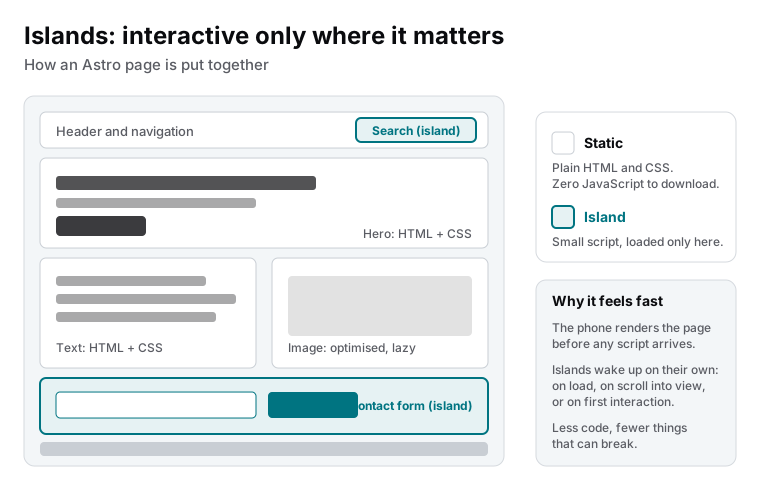
Islands architecture is a way of building web pages where the page itself is plain HTML and CSS, and only specific components, the islands, carry JavaScript. A search box, a contact form, an image carousel, a cart button: each is an island with its own small script and its own rule for when that script loads. Everything around them, the text, the headings, the images, the layout, ships without any script at all.
The result is a page that appears immediately on any device, with interactivity arriving where it is needed and nowhere else.
Why it matters on a phone
A phone has to download, parse and run JavaScript before a script-rendered page becomes usable. On a mid-range device over mobile data, that step is the largest share of the wait. Sites that render everything with a JavaScript framework send the whole framework and the whole page’s logic to every visitor, including the visitor who came to read one article.
With islands, the browser gets HTML first and renders it. The visitor is reading before the first island’s script has arrived. When it does, it wakes up only that component. The total amount of script is a fraction of the framework-rendered equivalent, and none of it stands between the visitor and the content.
The loading rules
| Rule | When the island’s script loads | Good for |
|---|---|---|
| On load | As soon as the page is ready | Navigation that must respond immediately |
| When idle | Once the browser has nothing urgent to do | Anything above the fold that is not critical |
| When visible | When the component scrolls into view | Forms, carousels and widgets further down the page |
| On interaction | On the first click, tap or focus | Menus, search boxes, anything that waits for the visitor |
| By screen size | Only on desktop, or only on mobile | Components that exist for one kind of device |
A form at the bottom of a long page loads its script only when someone scrolls there. A search box loads when someone clicks it. The page never pays for interaction nobody uses.
How it changes the way a site is built
Islands force a question that framework-rendered sites skip: does this component need to be interactive at all? The honest answer for most of a business website is no. A services section, a case study, a pricing explanation, a footer: HTML and CSS, no script. The few components that truly need script get it, isolated and small.
That discipline has side effects beyond speed. Less script means fewer dependencies, fewer things to update and fewer things that can break. It also means the page works when a script fails or is blocked, because the content never depended on it.
Where it stops
Islands are for pages that are mostly content with some interaction. When most of a page depends on who is logged in and what they did, when state is shared across many components and changes constantly, the page has become an application, and an application framework is the better tool. We build both; the line is worth drawing early.
What this means for you
When you see a new website proposal, ask two questions: how much JavaScript does a visitor download to read a plain page, and which components are interactive and when do they load. A site built on islands answers “almost none” and has a short, deliberate list. That is what fast on phones looks like in practice.

Founder and CEO of CivSec S.M.A.R.T, and responsible for everything we publish in this knowledge base.
How this article was made: researched and drafted with the help of AI tools, working from the sources listed below, and checked before publication. How we write.
Last updated . Spotted something outdated? Tell us.
Frequently asked questions
How is this different from a normal website with some JavaScript?
In principle it is that, done with discipline and tooling. The difference from the common approach is the default: many frameworks render the whole page with JavaScript and send all of it to every visitor. Islands flip the default to plain HTML and make each piece of script an explicit, isolated decision.
Does an island slow down the rest of the page?
No. Each island loads independently and the page does not wait for it. If the search box's script is slow or fails, the article text is already on screen and unaffected. That isolation is the point.
When does an island load?
You choose per island: immediately on page load, when the browser is idle, when it scrolls into view, when the visitor first interacts, or only on certain screen sizes. A contact form at the bottom of a page does not need its script until someone scrolls there.
Can a whole application be built as islands?
Small ones, yes. A large application with logins, roles and live data is better served by an application framework. Islands are for pages that are mostly content with some interaction, which describes a business website or storefront.
Sources
- Astro documentation: Islands architecture (accessed 2026-09-11)
- Google web.dev: Web Vitals (accessed 2026-09-11)