Cumulative Layout Shift: why things jump and how to stop it
A page that jumps while loading makes people tap the wrong thing. Cumulative Layout Shift measures it. The four causes, the 0.1 target, and the fixes.
 By Shalena Opbroek, Founder and CEO
The short answer
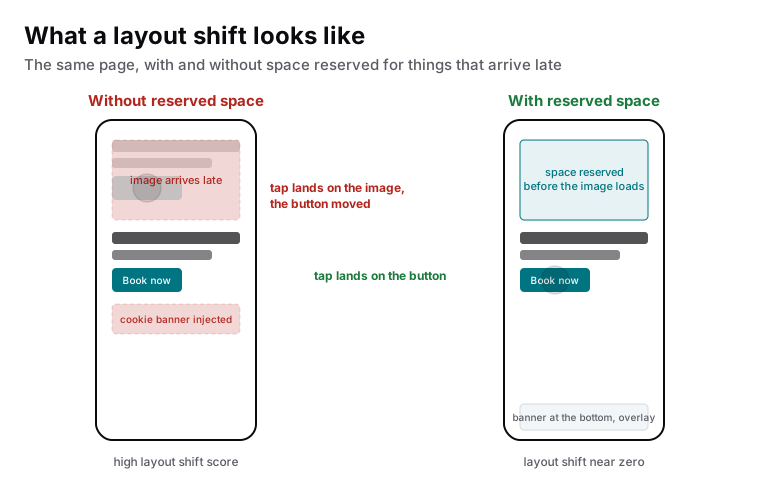
Cumulative Layout Shift, CLS, is a score for how much a page’s visible content moves without the visitor causing it. The image that loads and pushes the text down. The banner that appears at the top. The button that jumps just as someone taps it. Google’s target is 0.1 or less for real visitors, and above that the page feels unstable and people hit the wrong things.
The causes are few and the fixes are mechanical: reserve the space before the thing arrives.
The four usual causes
| Cause | What happens | The fix |
|---|---|---|
| Images and videos without dimensions | The browser does not know how tall they are, so it lays out the text first and pushes it down when the image arrives | Width and height attributes on every image and embed, so the space is reserved |
| Content injected above the fold | A banner, notification bar or promotional strip inserted at the top after the page rendered | Show it as an overlay, or reserve its space, or place it at the bottom |
| Fonts that swap | Text renders in a fallback font, then reflows when the web font arrives, changing line lengths | Self-host, preload, and choose a fallback with matching metrics so the swap does not move lines |
| Late embeds and third-party content | Maps, videos, social widgets and ads arrive with unknown size | A fixed-size container around each embed |
How to fix it
- Find the shifting elements. PageSpeed Insights and browser performance tools list which elements moved and by how much.
- Give every image and embed dimensions. The fix that addresses the most common cause. Modern image handling does this automatically; older content systems and themes do not.
- Move dynamic content out of the flow. Banners and bars as overlays or at the bottom, never inserted above content the visitor is reading.
- Fix the fonts. Self-hosted, preloaded, with a fallback font sized to match, so text does not jump when the web font loads.
- Contain third-party embeds. A box with a fixed aspect ratio, so a map or video fills a space that already existed.
- Watch animations. Animate transforms and opacity, not height or margins, so nothing around the element moves.
Why it matters beyond the score
Layout shift is the Core Web Vital that costs actions directly. A visitor reads a price, moves to tap “Add to cart”, and the button drops thirty pixels because an image above it finished loading. They tap the image. Some try again; some leave. On a shop or a booking flow, that is revenue leaving in a way no report shows.
What this means for you
CLS is the most mechanical of the three Core Web Vitals to fix: dimensions on media, dynamic content out of the flow, fonts handled properly, embeds in containers. If your report shows it as poor, the causes are almost certainly in that list, and fixing them is template work that improves every page at once.

Founder and CEO of CivSec S.M.A.R.T, and responsible for everything we publish in this knowledge base.
How this article was made: researched and drafted with the help of AI tools, working from the sources listed below, and checked before publication. How we write.
Last updated . Spotted something outdated? Tell us.
Frequently asked questions
What does a score of 0.1 mean?
It is a combined measure of how large the shifting area was and how far it moved, across the visit. There are no units. Below 0.1 visitors rarely notice anything; above 0.25 the page visibly jumps. The practical target is to make nothing move that the visitor did not cause.
Our page looks fine to me. Why is CLS poor?
On your fast connection the image, font and banner arrive before you can see them move. On a phone over mobile data they arrive late, one by one, each pushing content down. CLS is measured from real visitors, so it reflects their experience, not yours.
Are cookie banners a CLS problem?
Only if they push content down. A banner inserted at the top of the page shifts everything below it; a banner shown as an overlay at the bottom shifts nothing. The same is true for notification bars and promotional strips.
Does CLS affect sales?
Directly. The classic failure is a button that moves down just as the visitor taps, so they hit an image or a link instead. Every one of those is an abandoned action. Stores and booking flows feel this most, because the buttons matter most.
Sources
- Google web.dev: Cumulative Layout Shift (CLS) (accessed 2026-09-11)
- Google web.dev: Optimize Cumulative Layout Shift (accessed 2026-09-11)