Content Security Policy: what it is and why most sites do not have one
A Content Security Policy tells the browser where scripts may come from. Why it stops injected code, why most sites skip it, and how to add one safely.
 By Shalena Opbroek, Founder and CEO
The short answer
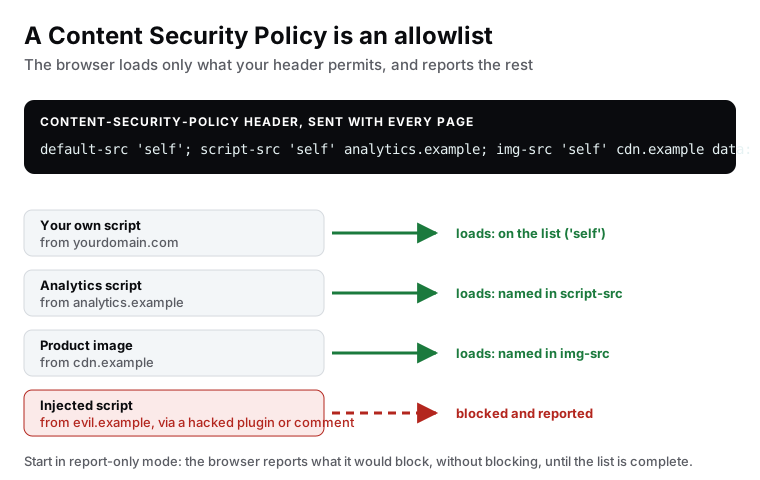
A Content Security Policy is a header your site sends with every page. It lists where the browser may load things from: scripts from here, styles from there, images from these places, frames from nowhere. The browser follows the list and blocks everything else. That one rule stops the most damaging category of web attack, injected scripts, because an injected script comes from a source that is not on your list. The exception is a script written straight into the page rather than loaded from somewhere, and how a policy treats those decides how much of this holds.
It is also the header most small business websites do not have, for one reason: it takes testing.
Why it matters more than the other headers
The other security headers each close one specific gap. A CSP closes the one that hurts most. If an attacker manages to place a script on your page, through an outdated plugin, a comment that was not escaped, a compromised advertising or analytics provider, that script can read what visitors type, steal sessions and change what the page shows. A CSP means the script does not run, because the browser was told exactly where scripts may come from and that source is not on the list.
The one value that decides whether it protects you
Most injected scripts are not loaded from anywhere. They are written straight into the page: a <script> tag with the code inside it, or an onclick attribute on a link. A list of allowed sources says nothing about those, so a policy has to state separately whether code written into the page may run at all.
'unsafe-inline' is the value that says it may, and it is in most real policies. It is the quickest way to stop a policy from breaking a site, because tag managers, themes and frameworks all write inline scripts: the policy blocks them, something visible stops working, and the value gets added to make it stop. The name is the warning. With 'unsafe-inline' in script-src, an injected inline script runs exactly as it would without any policy, and what remains is protection against scripts loaded from unlisted domains.
There are two ways to allow your own inline scripts without allowing everyone else’s.
| Approach | How it works | What it costs |
|---|---|---|
| Nonce | The server puts a fresh random value in the header and the same value on each of its own inline scripts. The browser runs only the ones that match. | A value generated per request, so the page cannot simply be served from a static cache |
| Hash | The policy lists a cryptographic hash of each allowed inline script. The browser runs a script only if its content hashes to a listed value. | Scripts that do not change, and a build that recalculates the hash when they do |
Both are real work, and that is the honest reason 'unsafe-inline' is so common. It is also why a policy is worth reading rather than counting. A site with a policy that allows inline scripts has a policy; whether it has the protection described above is a different question with a different answer. The same value in style-src is a smaller problem than in script-src, but it is the same kind of problem.
Why most sites skip it
Because it is the one header that visibly breaks things when it is wrong. Every third-party script, every embedded video, every font from a font service, every chat widget is a line in the policy. Forget one and a feature stops working. Faced with that, many suppliers leave it out, and many scanners politely list it as “recommended”.
How to add one safely
- List what your site actually loads. Your own scripts and styles, analytics, fonts, embeds, images from a CDN, frames. A site with few third parties has a short list, which is also a fast and private site.
- Decide what happens to inline scripts. If anything on your site writes script directly into the page, you either allow all inline code and give up most of the protection, or you move those scripts into files, or you use nonces or hashes. Make this choice before writing the policy, because it decides what the policy is worth.
- Write the policy in report-only mode. The header is
Content-Security-Policy-Report-Only. The browser reports what it would block and blocks nothing. - Collect reports for a week or two. Every report is either a source you forgot, which you add, or something that should not be there, which you remove from the site.
- Switch to enforcing. Same policy, header renamed to
Content-Security-Policy. Keep reporting on, so future changes show up. - Review on every new tag. Adding a script means adding a line. Make it part of the change, not a surprise afterwards.
What a policy looks like for a simple site
For a static business website with its own scripts, one analytics provider and self-hosted fonts, the policy fits on three lines: default to self, scripts from self and the analytics domain, images from self and a data scheme for small inline images, no frames allowed, and no 'unsafe-inline', which is possible because the site’s own scripts live in files rather than in the page. That is the whole thing. Sites built with few dependencies get the strongest protection with the least effort, which is one more argument for building them that way.
What this means for you
Ask whoever runs your site whether it sends a Content Security Policy, and if it does, whether script-src contains 'unsafe-inline'. Those are two separate answers and only the second one tells you what the policy is worth. The honest answer is usually “it takes testing”. Report-only mode makes the testing safe, and for a site with few third-party scripts the whole exercise is days, not weeks. It is the header that turns a hacked plugin from an incident into a blocked request.

Founder and CEO of CivSec S.M.A.R.T, and responsible for everything we publish in this knowledge base.
How this article was made: researched and drafted with the help of AI tools, working from the sources listed below, and checked before publication. How we write.
Last updated . Spotted something outdated? Tell us.
Frequently asked questions
What does a CSP protect against, exactly?
Mainly cross-site scripting: an attacker getting a script into your page through a hacked plugin, a comment field, an ad network or a compromised third party. Without a CSP that script runs with full access to the page. With one, the browser refuses to load it because its source is not on the list, provided the policy does not also permit inline code, which is the detail to check in any policy you are shown.
Will a CSP break my analytics or chat widget?
Only if you forget to list them. Every third-party script, style, font and frame needs a line. That is exactly why you start in report-only mode: the browser tells you what it would have blocked, you add the legitimate sources, and only then enforce.
Our site has one script. Do we still need this?
A site with one script has the easiest CSP in the world, and it gains the most, because the list is short and nothing on the site forces you to permit inline code. The header is a few lines and takes an hour.
Can a CSP be too strict?
Yes, and a too-strict policy that breaks a form is worse than none, because someone will disable it in a hurry and never come back. Aim for a policy that is complete for what your site actually uses, tested in report-only mode, and reviewed whenever a tag is added.
Sources
- HTTP Archive Web Almanac 2025: Security (accessed 2026-09-14)
- MDN Web Docs: Content Security Policy (accessed 2026-09-11)
- OWASP Cheat Sheet: Content Security Policy (accessed 2026-09-11)